Dodge That Brick! with Bolt IoT
Overview
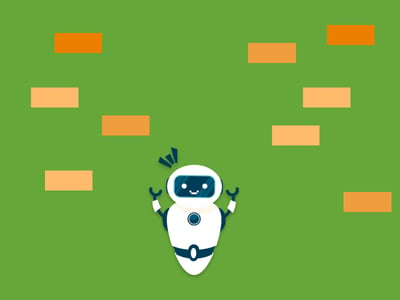
Can you build a game using the Bolt IoT platform? While creating such a game would typically need expertise in electronics, data analytics and JavaScript, the Bolt IoT platform's ease of use makes development feasible for anyone. This project walks you through building a dodge-the-brick game controlled by physical buttons connected to a Bolt WiFi Module.
Hardware Components
| Component | Quantity |
|---|---|
| Bolt WiFi Module | 1 |
| Micro-USB Cable with Power Supply | 1 |
| Micro-switches (buttons) | 2 |
| 1k Ohm Resistors | 2 |
| Breadboard | 1 |
| Male-to-Male Berge Pin Connectors | As needed |
Software Requirements
- Bolt Cloud
Hardware Setup
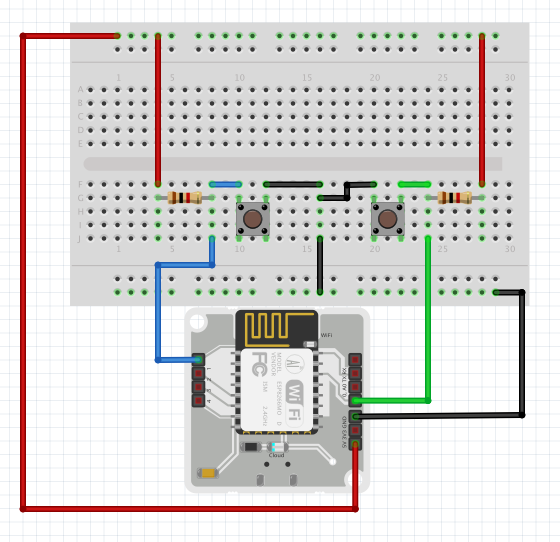
Step 1: Circuit Connection
Create the circuit connections using the Fritzing diagram below. Pin 0 connects to the left button; Pin 1 connects to the right button. Other available digital pins include 2, 3, and 4.
Step 2: Power and Connect
Power the system via the micro-USB cable. Link the Bolt WiFi module to your WiFi network and your Bolt Cloud account using the provided documentation.
Software Programming
Step 1: Create a Product
- Access the Products tab in the Cloud Dashboard
- Click "Build" for your first product or "Add Product" for additional products
- Configure the product as desired
- Select "Input Device" and "GPIO"
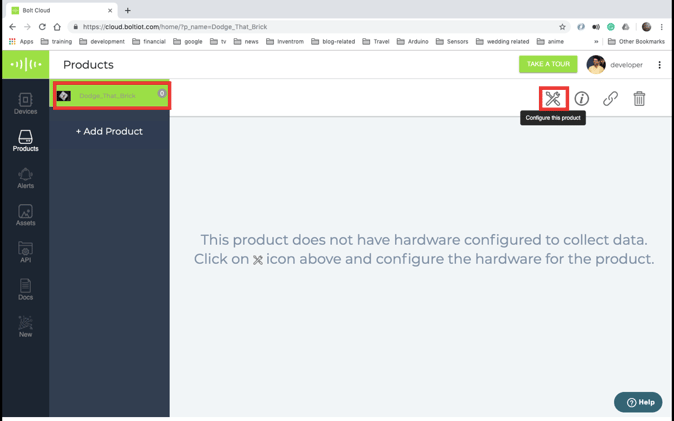
Step 2: Configure the Product
- Select the created product
- Click the configure button
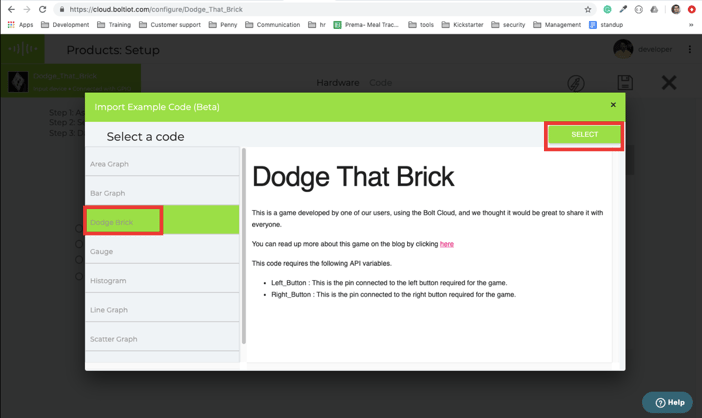
- Click the "Import Code" button
- Select "Dodge Brick" from the popup
- Assign Pin 0 for the left button, Pin 1 for the right button
- Click "Generate"
- Import the code, naming it (e.g., "game")
- Select file type as "js" and save
Step 3: Link Device to Product
- In the products section, select your configured product
- Click the link button
- Select your device from the available list
- Click OK
Step 4: Play the Game
Click the "View this device" button and start playing!
Code Explanation
The game is built on eight key functions:
1. On_document_ready Function
Sets up the game environment by establishing an HTML canvas object for drawing bricks and players, then initiates gameplay.
2. start_game Function
Initializes game entities (boulders and player), starts two background threads that call update_canvas and get_player_input periodically.
3. stop_game Function
Terminates the game by killing the two update threads.
4. restart_game Function
Stops the game, then restarts it after approximately two seconds.
5. get_player_input Function
Makes AJAX calls to the Bolt Cloud remote API to retrieve button states from connected pins. Updates player position based on button input. Called once every two seconds to prevent API blocking.
6. draw_boulder Function
Renders all boulders present in the active game on the canvas.
7. draw_player Function
Draws the player on the canvas. You can modify this function to substitute custom characters instead of the default red brick.
8. update_canvas Function
Executes the primary game control logic, called 10 times per second. The function clears the canvas, draws the player, iterates through boulder entities, increases boulder y-coordinates, calculates vertex positions, detects collision between boulders and the player, and restarts the game upon collision.
Conclusion
With these steps, and a little tweaking of the code, you can make any game you want using the Bolt IoT Platform. The project demonstrates the versatility of the platform beyond typical IoT applications, showing how physical buttons can interact with web-based game logic through the Bolt Cloud API.